
Bridges by EPOCH breaks ground in Hingham
EPOCH Senior Living broke ground on its newest Bridges by EPOCH project in Hingham, Mass., in October. Bridges by EPOCH provides memory care assisted living for individuals with Alzheimer’s. The design and programming at Hingham will incorporate the latest research, and the staff will be focused on compassionate care. Bridges by EPOCH at Hingham will open in spring 2012. To learn more, visit www.BridgesByEPOCH.com.
Pivot creates website for AltaVita Memory Care Centre

Pivot Communication completed a website for local memory care community AltaVita. Located in Longmont, Colo., AltaVita provides high quality housing for individuals with memory-related illnesses such as Alzheimer’s. AltaVita is committed to kind, comprehensive care, and will eventually expand its MemoryCare Centre into a complete senior living community. Visit www.AltaVitaLiving.com to learn more.
Creative briefs for press releases: 15 points to consider before writing
Design briefs are wonderful tools to ensure the creative firm and the client are on the same page. Whether the project is a brochure, website, annual report or just a flyer, a design brief is a written summary of what the project entails, its objectives, a summary of key points that must be achieved within the finished creative project and deadlines.
Creative briefs should not be limited to just marketing collateral, though. They also can be used to guide work on a press release. To ensure you know a client’s objectives and key messages for a press release before you put fingers to the keyboard, answer the following 15 questions to first to keep yourself on target.
- Subject of the release?
- What is the news?
- Headline?
- Do you need a subhead and why?
- What is the marketing objective of the release?
- List the primary and secondary audiences for the release.
- What are the key messages the release should articulate?
- What is the impact of the release to your customers and the marketplace?
- Are there any supporting documents the writer will need for background?
- If the release is product or service related, when will this item be available?
- What are the pricing details?
- Are certain customers or third-party individuals interested in participating in the release?
- What executives should be included in the release for quotes, why, and what are their key points?
- Is there any chance the release could create problems for the customer, and if so, is the release a good idea?
- How will you distribute the press release (email, wire distribution, company website or newsletter among other options)?
What other items should be included in a press release creative brief?
Everyone’s a critic: How to leverage the power of Yelp
We discussed in a previous post why it’s important to manage your online image, but let’s talk about why Yelp stands out. Companies sometimes balk at getting involved with Yelp, wondering if it’s really worth their time or if they can just ignore the one-star diatribe from Henry M. and maybe it will go away.
The answer is that Yelp isn’t going away. For companies in service industries in particular, the site is too ubiquitous to ignore. Earlier this year, Yelp passed 41 million monthly visitors who have written more than 15 million reviews. That’s a lot of people basing their opinions of your business on the number of stars in your rating.
It’s important to remember that there are two sides to Yelp – the customer who takes the time to write a review and the customer who is checking out star ratings to decide where to eat or get their hair cut. Engaging on Yelp isn’t about giving power to the angry customer – it’s about showing your other customers what your business is all about so they can draw their own conclusions.
So how can you leverage all those visits and reviews to help your business?
1. Claim
The first step is to claim your business page. Go to Yelp.com, find your business page and look for the small text link that says “Work here? Unlock the Business Page.” It can usually be found beneath the business information.
Follow the steps to claim the page, making sure to use a stable email address. You will need to have access to the business telephone, as Yelp will robo-call the phone to verify ownership.
2. Prepare
Put together a plan. Who will be the point person responsible for monitoring the account? How often will they log in to engage customers? Which types of reviews warrant private or public responses? Will your business pay to upgrade to a slideshow, run Deals or use Ads? How should you publicize your page to your customers? Your PR professional or marketing team can help you come up with the best engagement strategy for your business.
3. Engage
Execute your plan and make sure you stick with it. If you say you’re going to log in three times a week, don’t engage five times a week for the first month and then forget a month. Stay consistent. It’s natural to become personally invested in the reviews, even defensive, but remind yourself to stay with your strategy, especially regarding which reviews merit responses. It doesn’t help your image to respond in kind to a critical reviewer, even if they did “get it wrong.”
4. Keep at it
Consistency and a long-term view are crucial. You won’t raise your star rating or flood your page with reviews overnight. Getting the word out about your page and encouraging customers to visit and review will help boost your numbers. Remember to stay positive – thoughtful reviews from diligent Yelpers count for more in the Yelp community than a review from one irascible customer who signed up just to post a rant. The more you are engaged with the Yelp community and your customers, the more success you’ll start to see.
EPOCH of Providence poets featured on TV
Channel 12 television in Providence, R.I., featured residents of EPOCH Senior Living who worked for months with Brown University Prof. Rick Benjamin to produce and publish a book of original poetry. Titled, “Life, Loss, Love,” the book’s proceeds benefit a literary scholarship for high-schoolers. To see the Channel 12 video and read more about the EPOCH poets, visit EPOCH Senior Living’s blog.
The Experience Factor celebrates its first birthday
Denver-based recruitment and staffing company The Experience Factor celebrated its first year in September 2011. The Experience Factor strives to connect remarkable people and remarkable companies, particularly in management, administrative and executive positions. To sign up for one of their newsletters or to view job postings, visit www.ExperienceFactor.com.
Pivot Communication designs marketing kit for Mercy Medical of Alabama
Pivot Communication designed a marketing starter kit for Mercy Medical of Alabama. Mercy Medical operates the LIFE Program of All-inclusive Care for the Elderly (PACE), a Medicare- and Medicaid-funded program that allows frail seniors to stay in their homes and still receive comprehensive care. The marketing kit included a poster, a trifold brochure and an end-user brochure.
The Great Facebook “Like Box” Disguise
I wanted to share a little tip that will help you to grow Facebook page followers directly from your website.
Until a few months ago, converting website visitors into Facebook fans was inefficient. A prospective fan would have to:
- Click on your Facebook link
- Be intrigued by your Facebook content
- Click the “Like” button to become a fan
Here is how to place a “Like” button on your website that will allow you to add fans directly from your website.
- Log in to your Facebook page.
- Click the “Edit Page” button.
- Navigate to the “Resources” page.
- Click “Use Social Plugins” link.
- Select the “Like Box” option.
Add this plugin to your website by clicking on the “Get Code” button and adding the code to your site.The Like Box is a great plugin you can add to your website to allow users to like your Facebook page, view a stream of recent posts, and see faces of friends who have become fans of your page.
For some, the standard Facebook “Like Box” might work well, but often this plugin is too large to incorporate into existing websites.
Here is the code to frame the Like Box plugin so only the like button displays. The trick is to place the plugin code into a div tag which has the overflow hidden.
<div style=”width:50px; height:24px; overflow:hidden;”>
PASTE LIKE BOX CODE HERE
</div>
Special events to get people talking
When you are opening a new location or introducing a new service or business, hosting an event is one way to get people talking and lay the groundwork for future marketing efforts. If it’s a new property, host a groundbreaking; if you are halfway built, have a beam signing or dusty shoe tour; if you are about to open, plan a grand opening.
Here are five tips to get you started:
Pick a good date and time
Make sure there is nothing important happening on the date you choose. You could be overshadowed, or make it difficult for people to attend. Google the date and check the chamber, city, county and local news outlet websites for upcoming events. You won’t be able to ensure everyone can come, but try and choose times that are convenient. The best time for the press is generally between 11 a.m. and 2 p.m.
Invite interesting people to speak
Ask appropriate speakers to say a few words. Local celebs and public officials are great, but think too about other angles. If you’re opening a bookstore, ask a local author to say a few words; if the building design is unique, ask the architect to talk about their vision; if it’s a recycling service, ask the municipal waste department for a representative who can discuss why reducing waste saves money and saves the environment. Keep presentations short, to the point and related to your project.
Be ready – for anything
Do you have a place for people to go if it rains? Where do people park? Do you need a podium and microphone? Should you offer light refreshments? Do you need bathroom facilities? Work from a comprehensive list of planning details. We adapted a planning list produced by the military; they don’t miss a thing.
Send invitations by mail
No, this isn’t a plug for the post office, but in the email barrage, “snail” mail still has a certain cachet. We like to hand address invites, too. You are more likely to get an RSVP for you headcount. Send out invites 2-3 weeks in advance.
Contact the media and provide good details
Before the event, blog, tweet it and send out a press release. Personally invite (write, email or call depending on your relationship) editors or reporters you really want to come. Have press kits ready with background info, facts and details that can help them write the story. If they can’t come, ask if you can provide them with photos and information afterward so they can still write a story. We always hear how newsrooms are understaffed. If you present information, and don’t try to “sell,” many reporters appreciate the support.
If you start to tell the story early, you’ll have more people talking about your project from the get-go. Events don’t need to be over the top, but if well thought out and timed right, they are a nice way to start the conversations.
Photography tips for the non-photographer
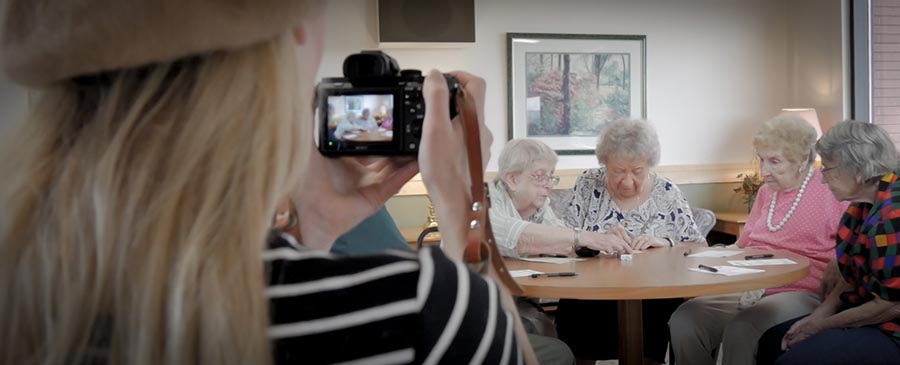
Sometimes, when you’re in need of photos for advertisements, websites or other visual materials, hiring a professional photographer to do the work isn’t realistic. Cost or time issues can prohibit it. That doesn’t mean you’re out of luck, though. There are a number of easy and less cost-prohibitive ways to get high-quality images, particularly now that digital is the name of the game. Read on for some tips on getting top-notch images without a professional photographer, or even a fancy camera.
Visualize, then shoot.
Imagine the image you want – the light, where the subject is located, where the camera is focused, the color, etc. Then work on capturing what you see in your mind’s eye.
Know your light.
Certain times of day – dusk and dawn – offer the best opportunity for even, flattering light. In general, keep the sun behind you at all times. When you’re indoors, be aware of natural light coming in from the windows – don’t position your subjects in front of that natural light, but rather in a way that allows as much natural light as possible to fall on them. Many cameras have a low-light or night mode that can be useful indoors as well. It’s important to hold your hand steady when using this setting, though, due to the longer exposure time.
Be aware of the background.
A cluttered and busy background distracts from what you want your viewer to focus on. Be aware of what is behind your main focus and declutter if necessary.
Try different angles.
With digital photography, it’s tempting to take the same photo several times with little variation, hoping something will turn out all right. Instead, take a few shots from each angle – landscape and portrait, from above, and from below. Try framing the subject differently as well – instead of capturing them straight on, consider positioning them to the side in order to capture a different angle.
All in all, experiment.
Memory cards can hold hundreds, even thousands of images. Play with the various aspects that affect your image, from the light to the angle to the framing and more. For every 20 shots, you may only have one or two usable images, but that’s what makes digital photography so great – you can just delete the other 18!

Follow Us!